Introduction to Smart-Home
Smart home is a residential platform, which integrates the facilities related to home life by using generic cabling technology, network communication technology, security prevention technology, automatic control technology and audio and video technology, constructs an efficient management system of residential facilities and family schedule affairs, improves the safety, convenience, comfort and artistry of home, and realizes an environment-friendly and energy-saving living environment.
Project realization
Smart home equipment developed and designed based on esp8266 and esp32-cam, including temperature detection, light bar control, computer LAN wake-up, intelligent camera car and other Internet of things smart home projects, integrating multi platform adaptation such as Xiaoai classmate, Xiaodu, tmall elf and so on.
Concrete Step
WiFi access is used. When the device and mobile phone are in the same LAN, it is LAN communication. In other cases, mqtt remote communication is used.
The arp8266 / esp32 extension needs to be installed in Arduino ide
Arduino ide 1.8.7 or later
Be sure to use esp8266 / esp32 Arduino package with release version 3.0.0 or above
1. WOL wake-up of PC is realized through UDP broadcast, which can realize network wake-up with the motherboard. Power on and power off can be realized with Shutdown UDP broadcast,Take esp8266 as an example:
  1#define BLINKER_WIFI
  2#define BLINKER_MIOT_OUTLET
  3
  4#define BLINKER_DUEROS_OUTLET
  5
  6#define BLINKER_ALIGENIE_OUTLET
  7
  8//#define BLINKER_WITHOUT_SSL
  9
 10#include <Servo.h>
 11#include <Blinker.h>
 12#include <WiFiUDP.h>
 13#include <ESP8266Ping.h>
 14
 15char auth[] = "35a74dc36a92";
 16char ssid[] = "Sweet_meng";
 17char pswd[] = "aita0116.";
 18
 19BlinkerButton Button1("k1");
 20BlinkerSlider Slider1("ser-num");   //实时位置 滑块 数据键名  范围1-180
 21
 22Servo myservo;
 23int ser_num;
 24//唤醒目标电脑的mac地址
 25byte mac[] = {0x00, 0xE0, 0x70, 0x49, 0x1D, 0xE7};
 26byte preamble[] = {0xFF, 0xFF, 0xFF, 0xFF, 0xFF, 0xFF};
 27//幻数据包需要在局域网中广播发送,要控制的电脑的网段的255地址
 28IPAddress ip(192, 168, 0, 255);
 29//建立一个WiFiUDP对象 UDP
 30WiFiUDP UDP;
 31//UDP接收地址,我这里是使用的广播,注意网段
 32const char *UDPAddress = "192.168.0.108";
 33//UDP端口
 34const int UDPPort = 7101;
 35bool oState = false;
 36
 37void heartbeat()
 38{
 39    BLINKER_LOG("heartbeat,state: ", oState);
 40    if (HIGH == oState)
 41    {
 42        Button1.print("on");
 43    }
 44    else
 45    {
 46        Button1.print("off");
 47    }
 48}
 49
 50void button1_callback(const String &state)
 51{
 52    BLINKER_LOG("get button state: ", state);
 53    if (state == BLINKER_CMD_ON)
 54    {
 55        BLINKER_LOG("Toggle on!");
 56        UDP.beginPacket(ip, 9);               //UDP发送到目标(IP,端口)
 57        UDP.write(preamble, sizeof preamble); //写入包头(FF,FF,FF,FF,FF,FF)
 58        for (byte i = 0; i < 16; i++)
 59        {
 60            UDP.write(mac, sizeof mac);
 61        }
 62        BLINKER_LOG("唤醒主机");
 63        UDP.endPacket();
 64        Button1.print("on");
 65        oState = true;
 66    }
 67    else if (state == BLINKER_CMD_OFF)
 68    {
 69        BLINKER_LOG("Toggle off!");
 70        char sd[] = "shut";                   //与电脑相对应的指令
 71        UDP.beginPacket(UDPAddress, UDPPort); //准备发送,设置地址和端口
 72        UDP.write((char *)sd, 8);
 73        BLINKER_LOG("关闭主机");
 74        UDP.endPacket();
 75        Button1.print("off");
 76        oState = false;
 77    }
 78    BlinkerMIOT.powerState(oState ? "on" : "off");
 79    BlinkerMIOT.print();
 80
 81    BlinkerDuerOS.powerState(oState ? "on" : "off");
 82    BlinkerDuerOS.print();
 83
 84    BlinkerAliGenie.powerState(oState ? "on" : "off");
 85    BlinkerAliGenie.print();
 86}
 87
 88void slider1_callback(int32_t value)
 89{
 90    ser_num = value;
 91    myservo.write(ser_num);
 92    Blinker.delay(500);
 93    BLINKER_LOG("get slider value: ", value);
 94}
 95
 96void miotPowerState(const String &state)
 97{
 98    BLINKER_LOG("need set power state: ", state);
 99    if (state == BLINKER_CMD_ON)
100    {
101        UDP.beginPacket(ip, 9);               //UDP发送到目标(IP,端口)
102        UDP.write(preamble, sizeof preamble); //写入包头(FF,FF,FF,FF,FF,FF)
103        for (byte i = 0; i < 16; i++)
104        {
105            UDP.write(mac, sizeof mac);
106        }
107        BLINKER_LOG("唤醒主机");
108        UDP.endPacket();
109        oState = true;
110    }
111    else if (state == BLINKER_CMD_OFF)
112    {
113        char sd[] = "shut";                   //与电脑相对应的指令
114        UDP.beginPacket(UDPAddress, UDPPort); //准备发送,设置地址和端口
115        UDP.write((char *)sd, 8);
116        BLINKER_LOG("关闭主机");
117        UDP.endPacket();
118        oState = false;
119    }
120    BlinkerMIOT.powerState(oState ? "on" : "off");
121    BlinkerMIOT.print();
122}
123
124void miotQuery(int32_t queryCode)
125{
126    BLINKER_LOG("MIOT Query codes: ", queryCode);
127    switch (queryCode)
128    {
129    case BLINKER_CMD_QUERY_ALL_NUMBER:
130        BLINKER_LOG("MIOT Query All");
131        BlinkerMIOT.powerState(oState ? "on" : "off");
132        BlinkerMIOT.print();
133        break;
134    case BLINKER_CMD_QUERY_POWERSTATE_NUMBER:
135        BLINKER_LOG("MIOT Query Power State");
136        BlinkerMIOT.powerState(oState ? "on" : "off");
137        BlinkerMIOT.print();
138        break;
139    default:
140        BlinkerMIOT.powerState(oState ? "on" : "off");
141        BlinkerMIOT.print();
142        break;
143    }
144}
145
146void duerPowerState(const String &state)
147{
148    BLINKER_LOG("need set power state: ", state);
149    if (state == BLINKER_CMD_ON)
150    {
151        UDP.beginPacket(ip, 9);               //UDP发送到目标(IP,端口)
152        UDP.write(preamble, sizeof preamble); //写入包头(FF,FF,FF,FF,FF,FF)
153        for (byte i = 0; i < 16; i++)
154        {
155            UDP.write(mac, sizeof mac);
156        }
157        BLINKER_LOG("唤醒主机");
158        UDP.endPacket();
159        oState = true;
160    }
161    else if (state == BLINKER_CMD_OFF)
162    {
163        char sd[] = "shut";                   //与电脑相对应的指令
164        UDP.beginPacket(UDPAddress, UDPPort); //准备发送,设置地址和端口
165        UDP.write((char *)sd, 8);
166        BLINKER_LOG("关闭主机");
167        UDP.endPacket();
168        oState = false;
169    }
170    BlinkerDuerOS.powerState(oState ? "on" : "off");
171    BlinkerDuerOS.print();
172}
173
174void duerQuery(int32_t queryCode)
175{
176    BLINKER_LOG("DuerOS Query codes: ", queryCode);
177    switch (queryCode)
178    {
179    case BLINKER_CMD_QUERY_ALL_NUMBER:
180        BLINKER_LOG("DuerOS Query All");
181        BlinkerDuerOS.powerState(oState ? "on" : "off");
182        BlinkerDuerOS.time(millis());
183        BlinkerDuerOS.print();
184        break;
185    case BLINKER_CMD_QUERY_POWERSTATE_NUMBER:
186        BLINKER_LOG("DuerOS Query Power State");
187        BlinkerDuerOS.powerState(oState ? "on" : "off");
188        BlinkerDuerOS.print();
189        break;
190    case BLINKER_CMD_QUERY_TIME_NUMBER:
191        BLINKER_LOG("DuerOS Query time");
192        BlinkerDuerOS.time(millis());
193        BlinkerDuerOS.print();
194        break;
195    default:
196        BlinkerDuerOS.powerState(oState ? "on" : "off");
197        BlinkerDuerOS.time(millis());
198        BlinkerDuerOS.print();
199        break;
200    }
201}
202
203void aligeniePowerState(const String &state)
204{
205    BLINKER_LOG("need set power state: ", state);
206    if (state == BLINKER_CMD_ON)
207    {
208        UDP.beginPacket(ip, 9);               //UDP发送到目标(IP,端口)
209        UDP.write(preamble, sizeof preamble); //写入包头(FF,FF,FF,FF,FF,FF)
210        for (byte i = 0; i < 16; i++)
211        {
212            UDP.write(mac, sizeof mac);
213        }
214        BLINKER_LOG("唤醒主机");
215        UDP.endPacket();
216        oState = true;
217    }
218    else if (state == BLINKER_CMD_OFF)
219    {
220        char sd[] = "shut";                   //与电脑相对应的指令
221        UDP.beginPacket(UDPAddress, UDPPort); //准备发送,设置地址和端口
222        UDP.write((char *)sd, 8);
223        BLINKER_LOG("关闭主机");
224        UDP.endPacket();
225        oState = false;
226    }
227    BlinkerAliGenie.powerState(oState ? "on" : "off");
228    BlinkerAliGenie.print();
229}
230
231void aligenieQuery(int32_t queryCode)
232{
233    BLINKER_LOG("AliGenie Query codes: ", queryCode);
234    switch (queryCode)
235    {
236    case BLINKER_CMD_QUERY_ALL_NUMBER:
237        BLINKER_LOG("AliGenie Query All");
238        BlinkerAliGenie.powerState(oState ? "on" : "off");
239        BlinkerAliGenie.print();
240        break;
241    case BLINKER_CMD_QUERY_POWERSTATE_NUMBER:
242        BLINKER_LOG("AliGenie Query Power State");
243        BlinkerAliGenie.powerState(oState ? "on" : "off");
244        BlinkerAliGenie.print();
245        break;
246    default:
247        BlinkerAliGenie.powerState(oState ? "on" : "off");
248        BlinkerAliGenie.print();
249        break;
250    }
251}
252
253void dataRead(const String &data)
254{
255    BLINKER_LOG("Blinker readString: ", data);
256    Blinker.vibrate();
257    uint32_t BlinkerTime = millis();
258    Blinker.print("millis", BlinkerTime);
259}
260
261void setup()
262{
263    Serial.begin(115200);
264    BLINKER_DEBUG.stream(Serial);
265    // BLINKER_DEBUG.debugAll();
266
267    myservo.attach(0);  //servo.attach():设置舵机数据引脚
268    myservo.write(90);  //servo.write():设置转动角度
269
270    Button1.attach(button1_callback);
271    Slider1.attach(slider1_callback);
272    Blinker.attachHeartbeat(heartbeat);
273
274    Blinker.begin(auth, ssid, pswd);
275    Blinker.attachData(dataRead);
276
277    BlinkerMIOT.attachPowerState(miotPowerState);
278    BlinkerMIOT.attachQuery(miotQuery);
279
280    BlinkerDuerOS.attachPowerState(duerPowerState);
281    BlinkerDuerOS.attachQuery(duerQuery);
282
283    BlinkerAliGenie.attachPowerState(aligeniePowerState);
284    BlinkerAliGenie.attachQuery(aligenieQuery);
285}
286
287void loop()
288{
289    Blinker.run();
290}
2. The light band of ws2812, combined with the fastled library, can achieve a variety of lighting effects,Take esp8266 as an example:
  1///////////////////////////////////////////////////////////////////////////K1灯效FastLED(依赖K2灯效FastLED)
  2
  3typedef void (*SimplePatternList1[])();
  4SimplePatternList1 gPatterns1 = {rainbow}; //rainbow, rainbowWithGlitter, confetti, sinelon, juggle, bpm 6种特效切换
  5
  6///////////////////////////////////////////////////////////////////////////K2灯效FastLED
  7// List of patterns to cycle through.  Each is defined as a separate function below.
  8typedef void (*SimplePatternList[])();
  9SimplePatternList gPatterns = {juggle}; //rainbow, rainbowWithGlitter, confetti, sinelon, juggle, bpm 6种特效切换
 10
 11uint8_t gCurrentPatternNumber = 0; // Index number of which pattern is current
 12uint8_t gHue = 0;                  // rotating "base color" used by many of the patterns
 13
 14#define ARRAY_SIZE(A) (sizeof(A) / sizeof((A)[0]))
 15
 16void nextPattern()
 17{
 18    // add one to the current pattern number, and wrap around at the end
 19    gCurrentPatternNumber = (gCurrentPatternNumber + 1) % ARRAY_SIZE(gPatterns);
 20}
 21
 22void rainbow()
 23{
 24    // FastLED's built-in rainbow generator
 25    fill_rainbow(leds, NUM_LEDS, gHue, 3);
 26}
 27
 28void rainbowWithGlitter()
 29{
 30    // built-in FastLED rainbow, plus some random sparkly glitter
 31    rainbow();
 32    addGlitter(80);
 33}
 34
 35void addGlitter(fract8 chanceOfGlitter)
 36{
 37    if (random8() < chanceOfGlitter)
 38    {
 39        leds[random16(NUM_LEDS)] += CRGB::White;
 40    }
 41}
 42
 43void confetti()
 44{
 45    // random colored speckles that blink in and fade smoothly
 46    fadeToBlackBy(leds, NUM_LEDS, 10);
 47    int pos = random16(NUM_LEDS);
 48    leds[pos] += CHSV(gHue + random8(64), 200, 255);
 49}
 50
 51void sinelon()
 52{
 53    // a colored dot sweeping back and forth, with fading trails
 54    fadeToBlackBy(leds, NUM_LEDS, 20);
 55    int pos = beatsin16(13, 0, NUM_LEDS - 1);
 56    leds[pos] += CHSV(gHue, 255, 192);
 57}
 58
 59void bpm()
 60{
 61    // colored stripes pulsing at a defined Beats-Per-Minute (BPM)
 62    uint8_t BeatsPerMinute = 62;
 63    CRGBPalette16 palette = PartyColors_p;
 64    uint8_t beat = beatsin8(BeatsPerMinute, 64, 255);
 65    for (int i = 0; i < NUM_LEDS; i++)
 66    { //9948
 67        leds[i] = ColorFromPalette(palette, gHue + (i * 2), beat - gHue + (i * 10));
 68    }
 69}
 70
 71void juggle()
 72{
 73    // eight colored dots, weaving in and out of sync with each other
 74    fadeToBlackBy(leds, NUM_LEDS, 20);
 75    byte dothue = 0;
 76    for (int i = 0; i < 8; i++)
 77    {
 78        leds[beatsin16(i + 7, 0, NUM_LEDS - 1)] |= CHSV(dothue, 200, 255);
 79        dothue += 32;
 80    }
 81}
 82
 83///////////////////////////////////////////////////////////////////////////K3灯效
 84//冷却:空气上升时会冷却多少?
 85//冷却少=火焰高. 冷却更多=火焰更短.
 86//默认值50,建议范围20-100
 87#define COOLING 50
 88
 89//发出火花:有什么机会(总共255个)点燃新的火花?
 90//更高的机会=更多的怒吼. 机会降低=火势更加闪烁.
 91//默认值为120,建议范围为50-200.
 92#define SPARKING 120
 93bool gReverseDirection = false;
 94void Fire2012()
 95{
 96    // Array of temperature readings at each simulation cell
 97    static byte heat[NUM_LEDS];
 98
 99    // Step 1.  Cool down every cell a little
100    for (int i = 0; i < NUM_LEDS; i++)
101    {
102        heat[i] = qsub8(heat[i], random8(0, ((COOLING * 10) / NUM_LEDS) + 2));
103    }
104
105    // Step 2.  Heat from each cell drifts 'up' and diffuses a little
106    for (int k = NUM_LEDS - 1; k >= 2; k--)
107    {
108        heat[k] = (heat[k - 1] + heat[k - 2] + heat[k - 2]) / 3;
109    }
110
111    // Step 3.  Randomly ignite new 'sparks' of heat near the bottom
112    if (random8() < SPARKING)
113    {
114        int y = random8(7);
115        heat[y] = qadd8(heat[y], random8(160, 255));
116    }
117
118    // Step 4.  Map from heat cells to LED colors
119    for (int j = 0; j < NUM_LEDS; j++)
120    {
121        CRGB color = HeatColor(heat[j]);
122        int pixelnumber;
123        if (gReverseDirection)
124        {
125            pixelnumber = (NUM_LEDS - 1) - j;
126        }
127        else
128        {
129            pixelnumber = j;
130        }
131        leds[pixelnumber] = color;
132    }
133}
134
135///////////////////////////////////////////////////////////////////////////K4灯效
136#if FASTLED_VERSION < 3001000
137#error "Requires FastLED 3.1 or later; check github for latest code."
138#endif
139// This function draws rainbows with an ever-changing,
140// widely-varying set of parameters.
141void pride()
142{
143    static uint16_t sPseudotime = 0;
144    static uint16_t sLastMillis = 0;
145    static uint16_t sHue16 = 0;
146
147    uint8_t sat8 = beatsin88(87, 220, 250);
148    uint8_t brightdepth = beatsin88(341, 96, 224);
149    uint16_t brightnessthetainc16 = beatsin88(203, (25 * 256), (40 * 256));
150    uint8_t msmultiplier = beatsin88(147, 23, 60);
151
152    uint16_t hue16 = sHue16; //gHue * 256;
153    uint16_t hueinc16 = beatsin88(113, 1, 3000);
154
155    uint16_t ms = millis();
156    uint16_t deltams = ms - sLastMillis;
157    sLastMillis = ms;
158    sPseudotime += deltams * msmultiplier;
159    sHue16 += deltams * beatsin88(400, 5, 9);
160    uint16_t brightnesstheta16 = sPseudotime;
161
162    for (uint16_t i = 0; i < NUM_LEDS; i++)
163    {
164        hue16 += hueinc16;
165        uint8_t hue8 = hue16 / 256;
166
167        brightnesstheta16 += brightnessthetainc16;
168        uint16_t b16 = sin16(brightnesstheta16) + 32768;
169
170        uint16_t bri16 = (uint32_t)((uint32_t)b16 * (uint32_t)b16) / 65536;
171        uint8_t bri8 = (uint32_t)(((uint32_t)bri16) * brightdepth) / 65536;
172        bri8 += (255 - brightdepth);
173
174        CRGB newcolor = CHSV(hue8, sat8, bri8);
175
176        uint16_t pixelnumber = i;
177        pixelnumber = (NUM_LEDS - 1) - pixelnumber;
178
179        nblend(leds[pixelnumber], newcolor, 64);
180    }
181}
182void mode_2()
183{
184    if (BRIGHTNESS < 20)
185    {
186        BRIGHTNESS = 20;
187        Slider1.print(BRIGHTNESS);
188    }
189    FastLED.setBrightness(BRIGHTNESS); //实时更新亮度
190    gPatterns1[gCurrentPatternNumber]();
191    FastLED.show();
192    FastLED.delay(200 / UPDATES_PER_SECOND);
193    EVERY_N_MILLISECONDS(20) { gHue++; }   // slowly cycle the "base color" through the rainbow
194    EVERY_N_SECONDS(10) { nextPattern(); } // change patterns periodically
195}
196
197void mode_3()
198{
199    if (BRIGHTNESS < 20)
200    {
201        BRIGHTNESS = 20;
202        Slider1.print(BRIGHTNESS);
203    }
204    FastLED.setBrightness(BRIGHTNESS); //实时更新亮度
205    gPatterns[gCurrentPatternNumber]();
206    FastLED.show();
207    FastLED.delay(1000 / (UPDATES_PER_SECOND / 10));
208
209    // do some periodic updates
210    EVERY_N_MILLISECONDS(20) { gHue++; }   // slowly cycle the "base color" through the rainbow
211    EVERY_N_SECONDS(10) { nextPattern(); } // change patterns periodically
212}
213
214void mode_4()
215{
216    if (BRIGHTNESS < 20)
217    {
218        BRIGHTNESS = 20;
219        Slider1.print(BRIGHTNESS);
220    }
221    Fire2012();
222    FastLED.setBrightness(BRIGHTNESS); //实时更新亮度
223    FastLED.delay(1000 / UPDATES_PER_SECOND);
224}
225
226void mode_5()
227{
228    if (BRIGHTNESS < 20)
229    {
230        BRIGHTNESS = 20;
231        Slider1.print(BRIGHTNESS);
232    }
233    FastLED.setBrightness(BRIGHTNESS); //实时更新亮度
234    pride();
235    FastLED.show();
236    FastLED.delay(1000 / (UPDATES_PER_SECOND / 5));
237}
238
3. Esp32-cam is equipped with a camera, which can build a video monitoring vehicle. The schematic diagram and PCB of esp32-cam base and the PCB of trolley base are as follows:
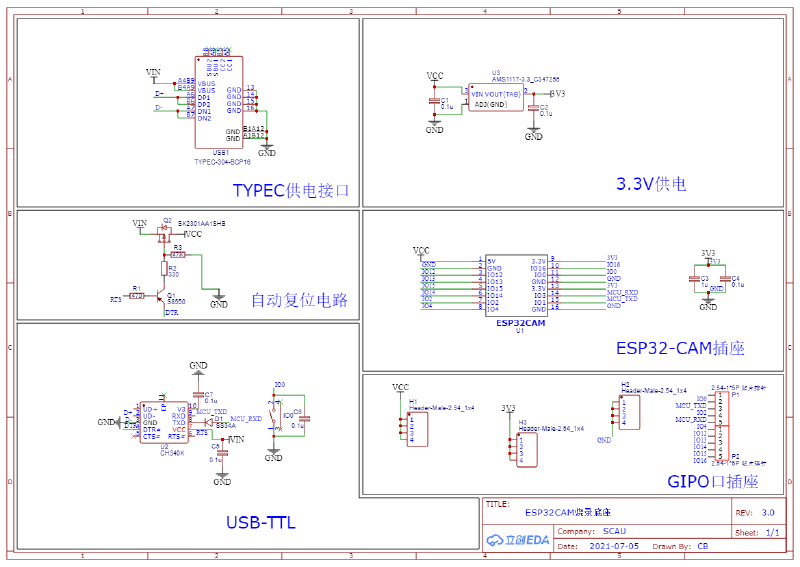
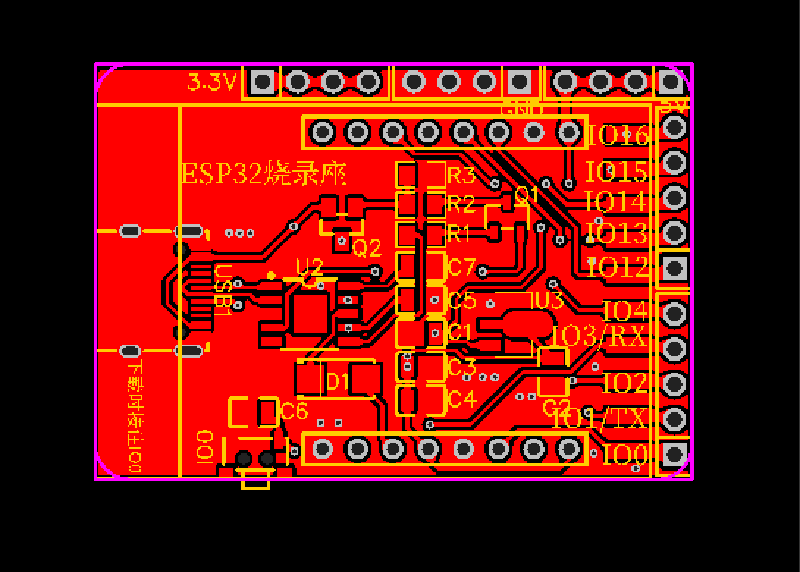
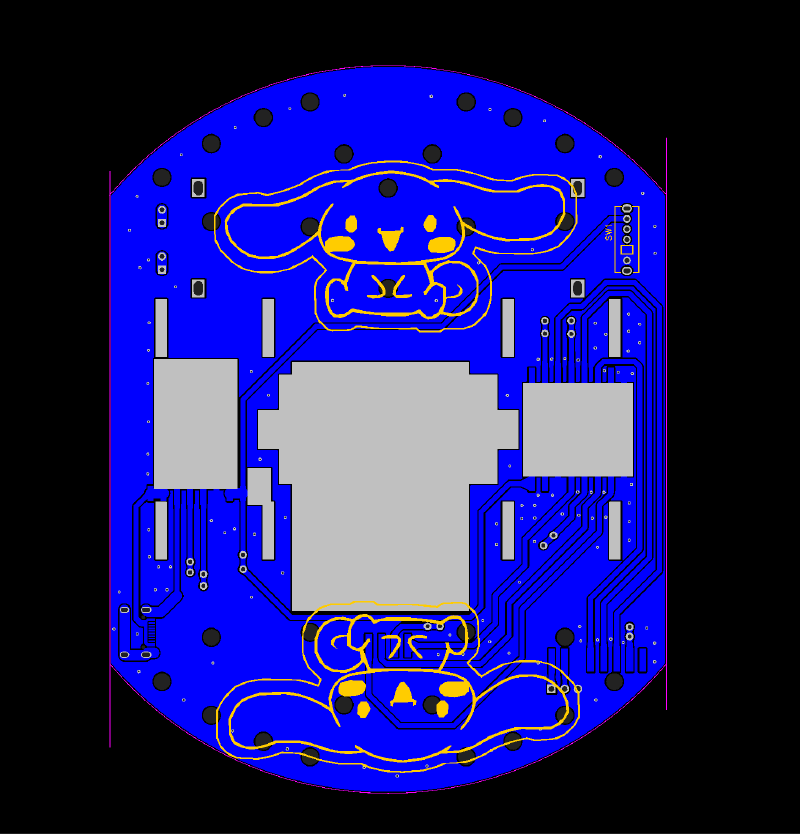
Take esp32 as an example:
 1int calculatePWM(int degree) //舵机角度
 2{
 3    //20ms周期,高电平0.5-2.5ms,对应0-180度角度
 4    const float deadZone = 6.4; //对应0.5ms(0.5ms/(20ms/256))
 5    const float max = 32;       //对应2.5ms
 6    if (degree < 0)
 7        degree = 0;
 8    if (degree > 180)
 9        degree = 180;
10    return (int)(((max - deadZone) / 180) * degree + deadZone);
11}
12
13void servo_360() //360度舵机控制
14{
15    if (y < 128)
16    {
17        ledcWrite(servo_channel, calculatePWM(88)); // 输出PWM
18    }
19    else if (y == 128)
20    {
21        ledcWrite(servo_channel, calculatePWM(92)); // 输出PWM
22    }
23    else if (y > 128)
24    {
25        ledcWrite(servo_channel, calculatePWM(96)); // 输出PWM
26    }
27}
28
29void xunhuan()
30{
31    ledcWrite(servo_channel, calculatePWM(angle)); // 输出PWM
32    ledcWrite(flashled_channel, flashled_pwm);     // 输出PWM
33    if ((y <= 37.5) && (x >= 37.5) && (x <= 217.5))//前进
34    {
35        ledcWrite(motorA1_channel, motor_pwm);
36        ledcWrite(motorA2_channel, 0);
37        ledcWrite(motorB1_channel, motor_pwm);
38        ledcWrite(motorB2_channel, 0);
39    }
40    if ((x <= 37.5) && (y >= 37.5) && (y <= 217.5))//左转
41    {
42        ledcWrite(motorA1_channel, 0);
43        ledcWrite(motorA2_channel, motor_pwm);
44        ledcWrite(motorB1_channel, motor_pwm);
45        ledcWrite(motorB2_channel, 0);
46    }
47    if ((x >= 217.5) && (y >= 37.5) && (y <= 217.5))//右转
48    {
49        ledcWrite(motorA1_channel, motor_pwm);
50        ledcWrite(motorA2_channel, 0);
51        ledcWrite(motorB1_channel, 0);
52        ledcWrite(motorB2_channel, motor_pwm);
53    }
54    if ((y >= 217.5) && (x >= 37.5) && (x <= 217.5))//后退
55    {
56        ledcWrite(motorA1_channel, 0);
57        ledcWrite(motorA2_channel, motor_pwm);
58        ledcWrite(motorB1_channel, 0);
59        ledcWrite(motorB2_channel, motor_pwm);
60    }
61     if ((x > 37.5) && (x < 217.5) && (y > 37.5) && (y < 217.5))//后退
62    {
63        ledcWrite(motorA1_channel, 0);
64        ledcWrite(motorA2_channel, 0);
65        ledcWrite(motorB1_channel, 0);
66        ledcWrite(motorB2_channel, 0);
67    }
68}
The complete source code of relevant projects in this article has been uploaded to gitee,Click to view More smart home project source code, such as smart fan, smart air conditioner, smart socket and so on.