智能家居简介
智能家居是以住宅为平台,利用综合布线技术、网络通信技术、安全防范技术、自动控制技术、音视频技术将家居生活有关的设施集成,构建高效的住宅设施与家庭日程事务的管理系统,提升家居安全性、便利性、舒适性、艺术性,并实现环保节能的居住环境。
项目实现
基于ESP8266、ESP32-CAM所开发设计智能家居设备,含温度检测,灯条控制,电脑LAN唤醒,智能摄像车等多个物联网智能家居项目,综合小爱同学,小度,天猫精灵等多平台适配。
具体步骤
使用WiFi接入,当设备和手机在同一个局域网中,为局域网通信,其余情况,使用MQTT远程通信。
Arduino IDE需安装好esp8266/esp32扩展
Arduino IDE 1.8.7或更新版本
务必使用 3.0.0 或以上release版本的 ESP8266/esp32 Arduino package
1.PC的WOL唤醒,是通过UDP广播实现,配合主板实现网络唤醒开机,关机可以配合关机UDP广播实现,以 esp8266 为例:
  1#define BLINKER_WIFI
  2#define BLINKER_MIOT_OUTLET
  3
  4#define BLINKER_DUEROS_OUTLET
  5
  6#define BLINKER_ALIGENIE_OUTLET
  7
  8//#define BLINKER_WITHOUT_SSL
  9
 10#include <Servo.h>
 11#include <Blinker.h>
 12#include <WiFiUDP.h>
 13#include <ESP8266Ping.h>
 14
 15char auth[] = "35a74dc36a92";
 16char ssid[] = "Sweet_meng";
 17char pswd[] = "aita0116.";
 18
 19BlinkerButton Button1("k1");
 20BlinkerSlider Slider1("ser-num");   //实时位置 滑块 数据键名  范围1-180
 21
 22Servo myservo;
 23int ser_num;
 24//唤醒目标电脑的mac地址
 25byte mac[] = {0x00, 0xE0, 0x70, 0x49, 0x1D, 0xE7};
 26byte preamble[] = {0xFF, 0xFF, 0xFF, 0xFF, 0xFF, 0xFF};
 27//幻数据包需要在局域网中广播发送,要控制的电脑的网段的255地址
 28IPAddress ip(192, 168, 0, 255);
 29//建立一个WiFiUDP对象 UDP
 30WiFiUDP UDP;
 31//UDP接收地址,我这里是使用的广播,注意网段
 32const char *UDPAddress = "192.168.0.108";
 33//UDP端口
 34const int UDPPort = 7101;
 35bool oState = false;
 36
 37void heartbeat()
 38{
 39    BLINKER_LOG("heartbeat,state: ", oState);
 40    if (HIGH == oState)
 41    {
 42        Button1.print("on");
 43    }
 44    else
 45    {
 46        Button1.print("off");
 47    }
 48}
 49
 50void button1_callback(const String &state)
 51{
 52    BLINKER_LOG("get button state: ", state);
 53    if (state == BLINKER_CMD_ON)
 54    {
 55        BLINKER_LOG("Toggle on!");
 56        UDP.beginPacket(ip, 9);               //UDP发送到目标(IP,端口)
 57        UDP.write(preamble, sizeof preamble); //写入包头(FF,FF,FF,FF,FF,FF)
 58        for (byte i = 0; i < 16; i++)
 59        {
 60            UDP.write(mac, sizeof mac);
 61        }
 62        BLINKER_LOG("唤醒主机");
 63        UDP.endPacket();
 64        Button1.print("on");
 65        oState = true;
 66    }
 67    else if (state == BLINKER_CMD_OFF)
 68    {
 69        BLINKER_LOG("Toggle off!");
 70        char sd[] = "shut";                   //与电脑相对应的指令
 71        UDP.beginPacket(UDPAddress, UDPPort); //准备发送,设置地址和端口
 72        UDP.write((char *)sd, 8);
 73        BLINKER_LOG("关闭主机");
 74        UDP.endPacket();
 75        Button1.print("off");
 76        oState = false;
 77    }
 78    BlinkerMIOT.powerState(oState ? "on" : "off");
 79    BlinkerMIOT.print();
 80
 81    BlinkerDuerOS.powerState(oState ? "on" : "off");
 82    BlinkerDuerOS.print();
 83
 84    BlinkerAliGenie.powerState(oState ? "on" : "off");
 85    BlinkerAliGenie.print();
 86}
 87
 88void slider1_callback(int32_t value)
 89{
 90    ser_num = value;
 91    myservo.write(ser_num);
 92    Blinker.delay(500);
 93    BLINKER_LOG("get slider value: ", value);
 94}
 95
 96void miotPowerState(const String &state)
 97{
 98    BLINKER_LOG("need set power state: ", state);
 99    if (state == BLINKER_CMD_ON)
100    {
101        UDP.beginPacket(ip, 9);               //UDP发送到目标(IP,端口)
102        UDP.write(preamble, sizeof preamble); //写入包头(FF,FF,FF,FF,FF,FF)
103        for (byte i = 0; i < 16; i++)
104        {
105            UDP.write(mac, sizeof mac);
106        }
107        BLINKER_LOG("唤醒主机");
108        UDP.endPacket();
109        oState = true;
110    }
111    else if (state == BLINKER_CMD_OFF)
112    {
113        char sd[] = "shut";                   //与电脑相对应的指令
114        UDP.beginPacket(UDPAddress, UDPPort); //准备发送,设置地址和端口
115        UDP.write((char *)sd, 8);
116        BLINKER_LOG("关闭主机");
117        UDP.endPacket();
118        oState = false;
119    }
120    BlinkerMIOT.powerState(oState ? "on" : "off");
121    BlinkerMIOT.print();
122}
123
124void miotQuery(int32_t queryCode)
125{
126    BLINKER_LOG("MIOT Query codes: ", queryCode);
127    switch (queryCode)
128    {
129    case BLINKER_CMD_QUERY_ALL_NUMBER:
130        BLINKER_LOG("MIOT Query All");
131        BlinkerMIOT.powerState(oState ? "on" : "off");
132        BlinkerMIOT.print();
133        break;
134    case BLINKER_CMD_QUERY_POWERSTATE_NUMBER:
135        BLINKER_LOG("MIOT Query Power State");
136        BlinkerMIOT.powerState(oState ? "on" : "off");
137        BlinkerMIOT.print();
138        break;
139    default:
140        BlinkerMIOT.powerState(oState ? "on" : "off");
141        BlinkerMIOT.print();
142        break;
143    }
144}
145
146void duerPowerState(const String &state)
147{
148    BLINKER_LOG("need set power state: ", state);
149    if (state == BLINKER_CMD_ON)
150    {
151        UDP.beginPacket(ip, 9);               //UDP发送到目标(IP,端口)
152        UDP.write(preamble, sizeof preamble); //写入包头(FF,FF,FF,FF,FF,FF)
153        for (byte i = 0; i < 16; i++)
154        {
155            UDP.write(mac, sizeof mac);
156        }
157        BLINKER_LOG("唤醒主机");
158        UDP.endPacket();
159        oState = true;
160    }
161    else if (state == BLINKER_CMD_OFF)
162    {
163        char sd[] = "shut";                   //与电脑相对应的指令
164        UDP.beginPacket(UDPAddress, UDPPort); //准备发送,设置地址和端口
165        UDP.write((char *)sd, 8);
166        BLINKER_LOG("关闭主机");
167        UDP.endPacket();
168        oState = false;
169    }
170    BlinkerDuerOS.powerState(oState ? "on" : "off");
171    BlinkerDuerOS.print();
172}
173
174void duerQuery(int32_t queryCode)
175{
176    BLINKER_LOG("DuerOS Query codes: ", queryCode);
177    switch (queryCode)
178    {
179    case BLINKER_CMD_QUERY_ALL_NUMBER:
180        BLINKER_LOG("DuerOS Query All");
181        BlinkerDuerOS.powerState(oState ? "on" : "off");
182        BlinkerDuerOS.time(millis());
183        BlinkerDuerOS.print();
184        break;
185    case BLINKER_CMD_QUERY_POWERSTATE_NUMBER:
186        BLINKER_LOG("DuerOS Query Power State");
187        BlinkerDuerOS.powerState(oState ? "on" : "off");
188        BlinkerDuerOS.print();
189        break;
190    case BLINKER_CMD_QUERY_TIME_NUMBER:
191        BLINKER_LOG("DuerOS Query time");
192        BlinkerDuerOS.time(millis());
193        BlinkerDuerOS.print();
194        break;
195    default:
196        BlinkerDuerOS.powerState(oState ? "on" : "off");
197        BlinkerDuerOS.time(millis());
198        BlinkerDuerOS.print();
199        break;
200    }
201}
202
203void aligeniePowerState(const String &state)
204{
205    BLINKER_LOG("need set power state: ", state);
206    if (state == BLINKER_CMD_ON)
207    {
208        UDP.beginPacket(ip, 9);               //UDP发送到目标(IP,端口)
209        UDP.write(preamble, sizeof preamble); //写入包头(FF,FF,FF,FF,FF,FF)
210        for (byte i = 0; i < 16; i++)
211        {
212            UDP.write(mac, sizeof mac);
213        }
214        BLINKER_LOG("唤醒主机");
215        UDP.endPacket();
216        oState = true;
217    }
218    else if (state == BLINKER_CMD_OFF)
219    {
220        char sd[] = "shut";                   //与电脑相对应的指令
221        UDP.beginPacket(UDPAddress, UDPPort); //准备发送,设置地址和端口
222        UDP.write((char *)sd, 8);
223        BLINKER_LOG("关闭主机");
224        UDP.endPacket();
225        oState = false;
226    }
227    BlinkerAliGenie.powerState(oState ? "on" : "off");
228    BlinkerAliGenie.print();
229}
230
231void aligenieQuery(int32_t queryCode)
232{
233    BLINKER_LOG("AliGenie Query codes: ", queryCode);
234    switch (queryCode)
235    {
236    case BLINKER_CMD_QUERY_ALL_NUMBER:
237        BLINKER_LOG("AliGenie Query All");
238        BlinkerAliGenie.powerState(oState ? "on" : "off");
239        BlinkerAliGenie.print();
240        break;
241    case BLINKER_CMD_QUERY_POWERSTATE_NUMBER:
242        BLINKER_LOG("AliGenie Query Power State");
243        BlinkerAliGenie.powerState(oState ? "on" : "off");
244        BlinkerAliGenie.print();
245        break;
246    default:
247        BlinkerAliGenie.powerState(oState ? "on" : "off");
248        BlinkerAliGenie.print();
249        break;
250    }
251}
252
253void dataRead(const String &data)
254{
255    BLINKER_LOG("Blinker readString: ", data);
256    Blinker.vibrate();
257    uint32_t BlinkerTime = millis();
258    Blinker.print("millis", BlinkerTime);
259}
260
261void setup()
262{
263    Serial.begin(115200);
264    BLINKER_DEBUG.stream(Serial);
265    // BLINKER_DEBUG.debugAll();
266
267    myservo.attach(0);  //servo.attach():设置舵机数据引脚
268    myservo.write(90);  //servo.write():设置转动角度
269
270    Button1.attach(button1_callback);
271    Slider1.attach(slider1_callback);
272    Blinker.attachHeartbeat(heartbeat);
273
274    Blinker.begin(auth, ssid, pswd);
275    Blinker.attachData(dataRead);
276
277    BlinkerMIOT.attachPowerState(miotPowerState);
278    BlinkerMIOT.attachQuery(miotQuery);
279
280    BlinkerDuerOS.attachPowerState(duerPowerState);
281    BlinkerDuerOS.attachQuery(duerQuery);
282
283    BlinkerAliGenie.attachPowerState(aligeniePowerState);
284    BlinkerAliGenie.attachQuery(aligenieQuery);
285}
286
287void loop()
288{
289    Blinker.run();
290}
2.WS2812的灯带,配合FastLED库,可以配合实现多种灯光效果,以 esp8266 为例:
  1///////////////////////////////////////////////////////////////////////////K1灯效FastLED(依赖K2灯效FastLED)
  2
  3typedef void (*SimplePatternList1[])();
  4SimplePatternList1 gPatterns1 = {rainbow}; //rainbow, rainbowWithGlitter, confetti, sinelon, juggle, bpm 6种特效切换
  5
  6///////////////////////////////////////////////////////////////////////////K2灯效FastLED
  7// List of patterns to cycle through.  Each is defined as a separate function below.
  8typedef void (*SimplePatternList[])();
  9SimplePatternList gPatterns = {juggle}; //rainbow, rainbowWithGlitter, confetti, sinelon, juggle, bpm 6种特效切换
 10
 11uint8_t gCurrentPatternNumber = 0; // Index number of which pattern is current
 12uint8_t gHue = 0;                  // rotating "base color" used by many of the patterns
 13
 14#define ARRAY_SIZE(A) (sizeof(A) / sizeof((A)[0]))
 15
 16void nextPattern()
 17{
 18    // add one to the current pattern number, and wrap around at the end
 19    gCurrentPatternNumber = (gCurrentPatternNumber + 1) % ARRAY_SIZE(gPatterns);
 20}
 21
 22void rainbow()
 23{
 24    // FastLED's built-in rainbow generator
 25    fill_rainbow(leds, NUM_LEDS, gHue, 3);
 26}
 27
 28void rainbowWithGlitter()
 29{
 30    // built-in FastLED rainbow, plus some random sparkly glitter
 31    rainbow();
 32    addGlitter(80);
 33}
 34
 35void addGlitter(fract8 chanceOfGlitter)
 36{
 37    if (random8() < chanceOfGlitter)
 38    {
 39        leds[random16(NUM_LEDS)] += CRGB::White;
 40    }
 41}
 42
 43void confetti()
 44{
 45    // random colored speckles that blink in and fade smoothly
 46    fadeToBlackBy(leds, NUM_LEDS, 10);
 47    int pos = random16(NUM_LEDS);
 48    leds[pos] += CHSV(gHue + random8(64), 200, 255);
 49}
 50
 51void sinelon()
 52{
 53    // a colored dot sweeping back and forth, with fading trails
 54    fadeToBlackBy(leds, NUM_LEDS, 20);
 55    int pos = beatsin16(13, 0, NUM_LEDS - 1);
 56    leds[pos] += CHSV(gHue, 255, 192);
 57}
 58
 59void bpm()
 60{
 61    // colored stripes pulsing at a defined Beats-Per-Minute (BPM)
 62    uint8_t BeatsPerMinute = 62;
 63    CRGBPalette16 palette = PartyColors_p;
 64    uint8_t beat = beatsin8(BeatsPerMinute, 64, 255);
 65    for (int i = 0; i < NUM_LEDS; i++)
 66    { //9948
 67        leds[i] = ColorFromPalette(palette, gHue + (i * 2), beat - gHue + (i * 10));
 68    }
 69}
 70
 71void juggle()
 72{
 73    // eight colored dots, weaving in and out of sync with each other
 74    fadeToBlackBy(leds, NUM_LEDS, 20);
 75    byte dothue = 0;
 76    for (int i = 0; i < 8; i++)
 77    {
 78        leds[beatsin16(i + 7, 0, NUM_LEDS - 1)] |= CHSV(dothue, 200, 255);
 79        dothue += 32;
 80    }
 81}
 82
 83///////////////////////////////////////////////////////////////////////////K3灯效
 84//冷却:空气上升时会冷却多少?
 85//冷却少=火焰高。 冷却更多=火焰更短。
 86//默认值50,建议范围20-100
 87#define COOLING 50
 88
 89//发出火花:有什么机会(总共255个)点燃新的火花?
 90//更高的机会=更多的怒吼。 机会降低=火势更加闪烁。
 91//默认值为120,建议范围为50-200。
 92#define SPARKING 120
 93bool gReverseDirection = false;
 94void Fire2012()
 95{
 96    // Array of temperature readings at each simulation cell
 97    static byte heat[NUM_LEDS];
 98
 99    // Step 1.  Cool down every cell a little
100    for (int i = 0; i < NUM_LEDS; i++)
101    {
102        heat[i] = qsub8(heat[i], random8(0, ((COOLING * 10) / NUM_LEDS) + 2));
103    }
104
105    // Step 2.  Heat from each cell drifts 'up' and diffuses a little
106    for (int k = NUM_LEDS - 1; k >= 2; k--)
107    {
108        heat[k] = (heat[k - 1] + heat[k - 2] + heat[k - 2]) / 3;
109    }
110
111    // Step 3.  Randomly ignite new 'sparks' of heat near the bottom
112    if (random8() < SPARKING)
113    {
114        int y = random8(7);
115        heat[y] = qadd8(heat[y], random8(160, 255));
116    }
117
118    // Step 4.  Map from heat cells to LED colors
119    for (int j = 0; j < NUM_LEDS; j++)
120    {
121        CRGB color = HeatColor(heat[j]);
122        int pixelnumber;
123        if (gReverseDirection)
124        {
125            pixelnumber = (NUM_LEDS - 1) - j;
126        }
127        else
128        {
129            pixelnumber = j;
130        }
131        leds[pixelnumber] = color;
132    }
133}
134
135///////////////////////////////////////////////////////////////////////////K4灯效
136#if FASTLED_VERSION < 3001000
137#error "Requires FastLED 3.1 or later; check github for latest code."
138#endif
139// This function draws rainbows with an ever-changing,
140// widely-varying set of parameters.
141void pride()
142{
143    static uint16_t sPseudotime = 0;
144    static uint16_t sLastMillis = 0;
145    static uint16_t sHue16 = 0;
146
147    uint8_t sat8 = beatsin88(87, 220, 250);
148    uint8_t brightdepth = beatsin88(341, 96, 224);
149    uint16_t brightnessthetainc16 = beatsin88(203, (25 * 256), (40 * 256));
150    uint8_t msmultiplier = beatsin88(147, 23, 60);
151
152    uint16_t hue16 = sHue16; //gHue * 256;
153    uint16_t hueinc16 = beatsin88(113, 1, 3000);
154
155    uint16_t ms = millis();
156    uint16_t deltams = ms - sLastMillis;
157    sLastMillis = ms;
158    sPseudotime += deltams * msmultiplier;
159    sHue16 += deltams * beatsin88(400, 5, 9);
160    uint16_t brightnesstheta16 = sPseudotime;
161
162    for (uint16_t i = 0; i < NUM_LEDS; i++)
163    {
164        hue16 += hueinc16;
165        uint8_t hue8 = hue16 / 256;
166
167        brightnesstheta16 += brightnessthetainc16;
168        uint16_t b16 = sin16(brightnesstheta16) + 32768;
169
170        uint16_t bri16 = (uint32_t)((uint32_t)b16 * (uint32_t)b16) / 65536;
171        uint8_t bri8 = (uint32_t)(((uint32_t)bri16) * brightdepth) / 65536;
172        bri8 += (255 - brightdepth);
173
174        CRGB newcolor = CHSV(hue8, sat8, bri8);
175
176        uint16_t pixelnumber = i;
177        pixelnumber = (NUM_LEDS - 1) - pixelnumber;
178
179        nblend(leds[pixelnumber], newcolor, 64);
180    }
181}
182void mode_2()
183{
184    if (BRIGHTNESS < 20)
185    {
186        BRIGHTNESS = 20;
187        Slider1.print(BRIGHTNESS);
188    }
189    FastLED.setBrightness(BRIGHTNESS); //实时更新亮度
190    gPatterns1[gCurrentPatternNumber]();
191    FastLED.show();
192    FastLED.delay(200 / UPDATES_PER_SECOND);
193    EVERY_N_MILLISECONDS(20) { gHue++; }   // slowly cycle the "base color" through the rainbow
194    EVERY_N_SECONDS(10) { nextPattern(); } // change patterns periodically
195}
196
197void mode_3()
198{
199    if (BRIGHTNESS < 20)
200    {
201        BRIGHTNESS = 20;
202        Slider1.print(BRIGHTNESS);
203    }
204    FastLED.setBrightness(BRIGHTNESS); //实时更新亮度
205    gPatterns[gCurrentPatternNumber]();
206    FastLED.show();
207    FastLED.delay(1000 / (UPDATES_PER_SECOND / 10));
208
209    // do some periodic updates
210    EVERY_N_MILLISECONDS(20) { gHue++; }   // slowly cycle the "base color" through the rainbow
211    EVERY_N_SECONDS(10) { nextPattern(); } // change patterns periodically
212}
213
214void mode_4()
215{
216    if (BRIGHTNESS < 20)
217    {
218        BRIGHTNESS = 20;
219        Slider1.print(BRIGHTNESS);
220    }
221    Fire2012();
222    FastLED.setBrightness(BRIGHTNESS); //实时更新亮度
223    FastLED.delay(1000 / UPDATES_PER_SECOND);
224}
225
226void mode_5()
227{
228    if (BRIGHTNESS < 20)
229    {
230        BRIGHTNESS = 20;
231        Slider1.print(BRIGHTNESS);
232    }
233    FastLED.setBrightness(BRIGHTNESS); //实时更新亮度
234    pride();
235    FastLED.show();
236    FastLED.delay(1000 / (UPDATES_PER_SECOND / 5));
237}
238
3.ESP32-CAM带有一个摄像头,可以搭建一个视频监控车,ESP32-CAM底座原理图和PCB,以及小车底座PCB如下:
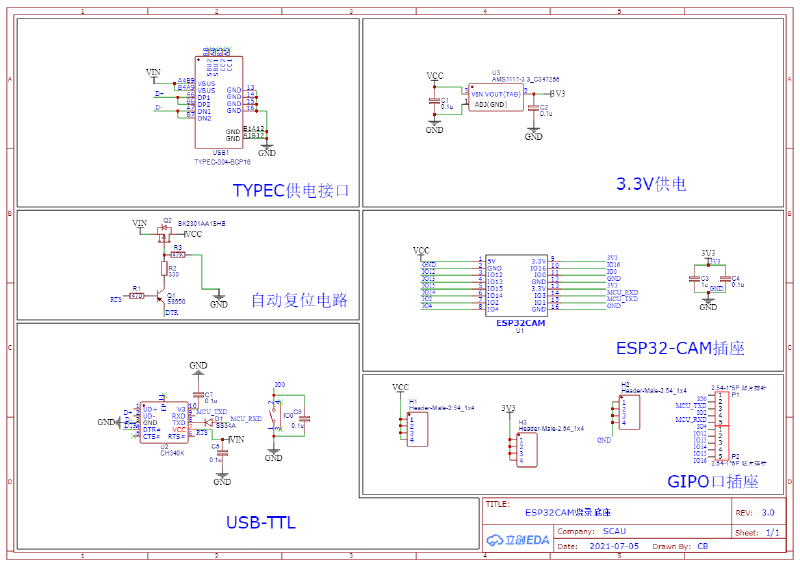
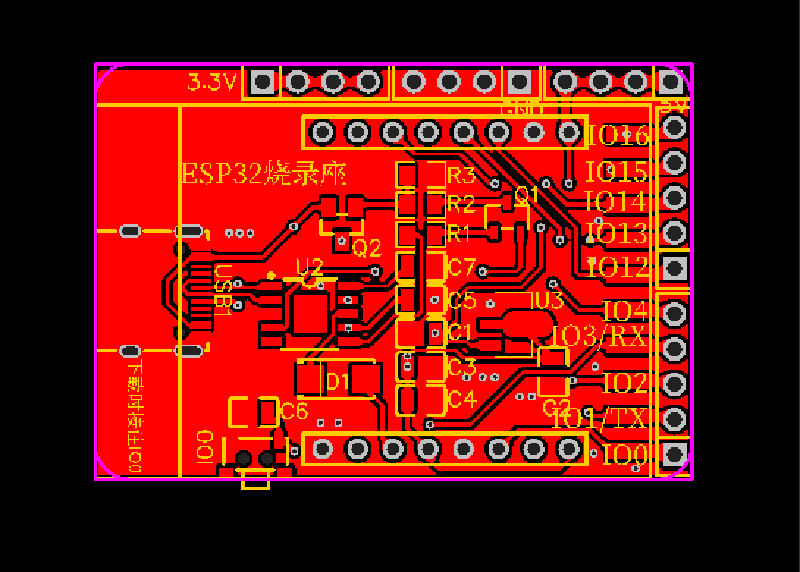
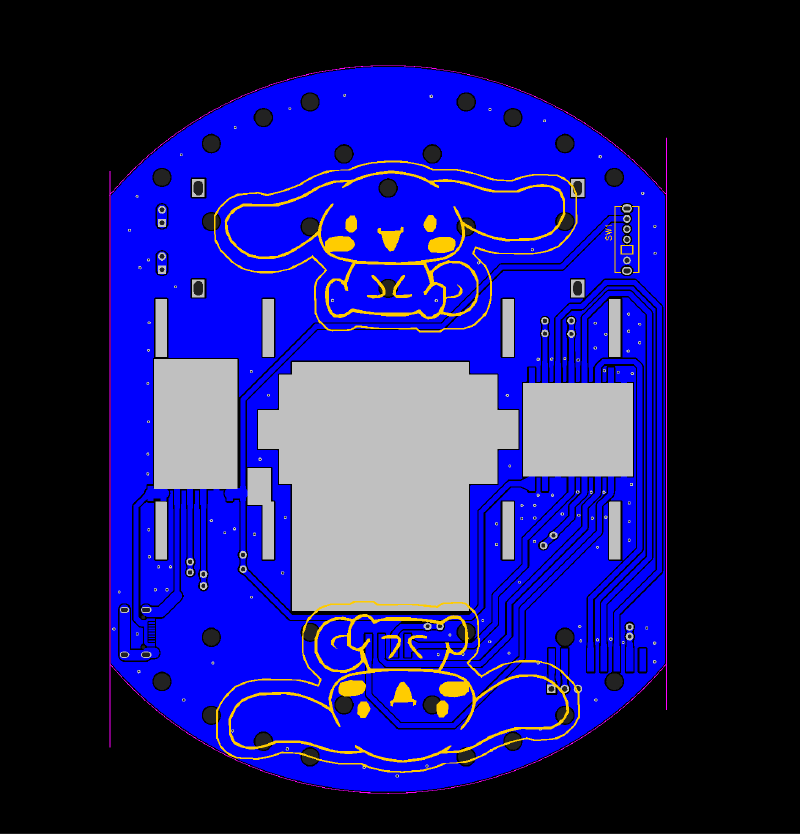
以 esp32 为例:
 1int calculatePWM(int degree) //舵机角度
 2{
 3    //20ms周期,高电平0.5-2.5ms,对应0-180度角度
 4    const float deadZone = 6.4; //对应0.5ms(0.5ms/(20ms/256))
 5    const float max = 32;       //对应2.5ms
 6    if (degree < 0)
 7        degree = 0;
 8    if (degree > 180)
 9        degree = 180;
10    return (int)(((max - deadZone) / 180) * degree + deadZone);
11}
12
13void servo_360() //360度舵机控制
14{
15    if (y < 128)
16    {
17        ledcWrite(servo_channel, calculatePWM(88)); // 输出PWM
18    }
19    else if (y == 128)
20    {
21        ledcWrite(servo_channel, calculatePWM(92)); // 输出PWM
22    }
23    else if (y > 128)
24    {
25        ledcWrite(servo_channel, calculatePWM(96)); // 输出PWM
26    }
27}
28
29void xunhuan()
30{
31    ledcWrite(servo_channel, calculatePWM(angle)); // 输出PWM
32    ledcWrite(flashled_channel, flashled_pwm);     // 输出PWM
33    if ((y <= 37.5) && (x >= 37.5) && (x <= 217.5))//前进
34    {
35        ledcWrite(motorA1_channel, motor_pwm);
36        ledcWrite(motorA2_channel, 0);
37        ledcWrite(motorB1_channel, motor_pwm);
38        ledcWrite(motorB2_channel, 0);
39    }
40    if ((x <= 37.5) && (y >= 37.5) && (y <= 217.5))//左转
41    {
42        ledcWrite(motorA1_channel, 0);
43        ledcWrite(motorA2_channel, motor_pwm);
44        ledcWrite(motorB1_channel, motor_pwm);
45        ledcWrite(motorB2_channel, 0);
46    }
47    if ((x >= 217.5) && (y >= 37.5) && (y <= 217.5))//右转
48    {
49        ledcWrite(motorA1_channel, motor_pwm);
50        ledcWrite(motorA2_channel, 0);
51        ledcWrite(motorB1_channel, 0);
52        ledcWrite(motorB2_channel, motor_pwm);
53    }
54    if ((y >= 217.5) && (x >= 37.5) && (x <= 217.5))//后退
55    {
56        ledcWrite(motorA1_channel, 0);
57        ledcWrite(motorA2_channel, motor_pwm);
58        ledcWrite(motorB1_channel, 0);
59        ledcWrite(motorB2_channel, motor_pwm);
60    }
61     if ((x > 37.5) && (x < 217.5) && (y > 37.5) && (y < 217.5))//后退
62    {
63        ledcWrite(motorA1_channel, 0);
64        ledcWrite(motorA2_channel, 0);
65        ledcWrite(motorB1_channel, 0);
66        ledcWrite(motorB2_channel, 0);
67    }
68}
本文相关项目完整源码已上传本人gitee,点击查看更多智能家居项目源码,如智能风扇,智能空调,智能插座等等。